Sunday, March 1, 2020

MediatR dependency resolved by Autofac and structureMap


MediatR is a messaging handler which has responsibility for dealing with command and queues.It simplify the controller with single dependency(Most of the case).
Controller use mediatr to send for the data they need to fetch or the action they need to perform.

MediatR with AutoFac :-
1. First need the mediatR using package manager console by command "Install-Package MediatR "
2. Install autofac by "Install-Package Autofac".


    // Intializes IOC container...
    var builder = new ContainerBuilder();
    builder.RegisterApiControllers(Assembly.GetExecutingAssembly());
    builder.RegisterWebApiFilterProvider(config);       
    builder.RegisterType<ApiWorkingContext>().As<IApiWorkingContext>();
    builder.Register(c => new     
            HttpContextWrapper(HttpContext.Current)).As(typeof(HttpContextBase));
       
    builder.RegisterAssemblyTypes(typeof(IMediator).GetTypeInfo().Assembly)
    .AsImplementedInterfaces();

    // Register all the Command classes (they implement IRequestHandler) in assembly holding the             Commands
    builder.RegisterAssemblyTypes(typeof(CreateOrderCommand).GetTypeInfo().Assembly)
    .AsClosedTypesOf(typeof(IRequestHandler<,>));

    builder.Register<ServiceFactory>(context =>
            {
                var componentContext = context.Resolve<IComponentContext>();
                return t => { object o; return componentContext.TryResolve(t, out o) ? o : null; };
            });

MediatR with StructureMap :-
1. First need the mediatR using package manager console by command "Install-Package MediatR "
2. Install autofac by "Install-Package structuremap".

  Scan.ConnectImplementationsToTypesClosing(typeof(IRequestHandler<,>));
  Scan.ConnectImplementationsToTypesClosing(typeof(INotificationHandler<>));
  Scan.AssemblyContainingType<IMediator>();
  Scan.WithDefaultConventions();
  Scan.For<IMediator>().Use<Mediator>();


Thursday, January 30, 2020

Generate unique random integers without collisions in sql server


Here is the solution to generate unique number  in sql server. We may use one of these calculations to generate a number in this set:

SELECT
  1000000 + (CONVERT(INT, CRYPT_GEN_RANDOM(3)) % 1000000),
  1000000 + (CONVERT(INT, RAND()*1000000) % 1000000),
  1000000 + (ABS(CHECKSUM(NEWID())) % 1000000);


But think again, Is number unique ?

Generating a random number on its own is not difficult, using methods like RAND() or CHECKSUM(NEWID()). The problem comes when you have to detect collisions. Let's take a quick look at a typical approach, assuming we want CustomerID values between 1 and 1,000,000: 

DECLARE @rc INT = 0,
  @CustomerID INT = ABS(CHECKSUM(NEWID())) % 1000000 + 1;
              -- or ABS(CONVERT(INT,CRYPT_GEN_RANDOM(3))) % 1000000 + 1;
              -- or CONVERT(INT, RAND() * 1000000) + 1;
WHILE @rc = 0
BEGIN
  IF NOT EXISTS (SELECT 1 FROM dbo.Customers WHERE CustomerID = @CustomerID)
  BEGIN
    INSERT dbo.Customers(CustomerID) SELECT @CustomerID;
    SET @rc = 1;
  END
  ELSE
  BEGIN
    SELECT @CustomerID = ABS(CHECKSUM(NEWID())) % 1000000 + 1,
      @rc = 0;
  END
END


Wait, As the table gets larger, not only does checking for duplicates get more expensive (More time required to complete the process)

Different Approach

One idea is to pre-calculate a large number of random number and store it in different table 

CREATE TABLE dbo.RandomIDs
(
  RowNumber INT PRIMARY KEY CLUSTERED,
  NextID INT 
) WITH (DATA_COMPRESSION = PAGE);
-- data compression used to minimize impact to disk and memory

-- if not on Enterprise or CPU is your bottleneck, don't use it
;WITH x AS
(
  SELECT TOP (1000000) rn = ROW_NUMBER() OVER (ORDER BY s1.[object_id])
    FROM sys.all_objects AS s1
    CROSS JOIN sys.all_objects AS s2
    ORDER BY s1.[object_id]
)
INSERT dbo.RandomIDs(RowNumber, NextID)
  SELECT rn, ROW_NUMBER() OVER (ORDER BY NEWID()) + 1000000
  FROM x;

Now, in order to generate the next ID, we can simply delete the lowest RowNumber available, and output its NextID for use. We'll use a CTE to determine the TOP (1) row so that we don't rely on "natural" order 

DECLARE @t TABLE(NextID INT);
;WITH NextIDGenerator AS
(
  SELECT TOP (1) NextID FROM dbo.RandomIDs ORDER BY RowNumber
)
DELETE NextIDGenerator OUTPUT deleted.NextID INTO @t;
INSERT dbo.Users(UserID /* , other columns */)
  SELECT NextID /* , other parameters */ FROM @t;


Saturday, January 18, 2020

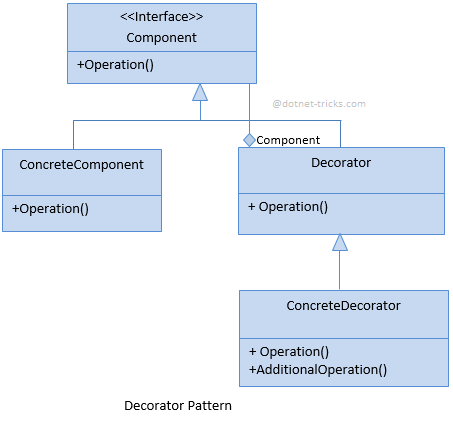
Decorator Design Pattern - C#

Attaching additional responsibilities to an object dynamically. Decorators provide a flexible alternative to subclassing for extending functionality.


The classes and objects participating in this pattern are:
  • Component 
    • defines the interface for objects that can have responsibilities added to them dynamically.
  • ConcreteComponent   
    • defines an object to which additional responsibilities can be attached.
  • Decorator 
    • maintains a reference to a Component object and defines an interface that conforms to Component's interface.
  • ConcreteDecorator 
    • adds responsibilities to the component.


Code :-

//Component
namespace DecoratorDemo.Component
{
    public interface IHome
    {
        string Make { get; }
        double GetPrice();
    }
}


//Concrete Component

  public class MyHome : Component.IHome
    {
        public string Make {
            get
            {
                return "MyHome";
            }
        }

        public double GetPrice()
        {
            return 8000000;
        }
    }


//Decorator
 public abstract class HomeDecorator : IHome
    {
        private readonly IHome home;

        public HomeDecorator(IHome home)
        {
            this.home = home;
        }
        public string Make
        {
            get
            {
                return "MyHome";
            }
        }

        public double GetPrice()
        {
            return home.GetPrice();
        }
        public abstract double GetDiscountPrice();
    }

  // Concrete Decorator
  public class OfferPrice : HomeDecorator
    {
        public OfferPrice(IHome home)  : base(home)
        {

        }
        public override double GetDiscountPrice()
        {
            return .8 * base.GetPrice();   
        }
    }

// Execution

 class Program
    {
        static void Main(string[] args)
        {
            IHome home = new MyHome();
            HomeDecorator decorator = new OfferPrice(home);

            Console.WriteLine(string.Format("Make : {0} Price {1} DiscountPrice {2}", decorator.Make, decorator.GetPrice(), decorator.GetDiscountPrice()));
        }
    }


OutPut
Make : MyHome Price 8000000 DiscountPrice 6400000


Thursday, November 28, 2019

Asynchronous file uploads in ASP.NET Web API

File upload is quite an important topic for Web API endpoints or for API-driven applications, and sure enough there are some nice changes to the MultiPartFormDataStreamProvider

Let’s have a look at how you could upload files to your ASP.NET Web API.

MultipartFormPost
This method has five parameters. You can increase/decrease the number of parameters according to your requirement. These five parameters are, 
  • Posturl 
    This must be the url to which you want to post the form.
  • userAgentThis is up to your requirement; if needed, then pass the value as required.
  • postParametersThis is of type Dictionary. You can pass the parameter name and value as “key-value”
  • headerkeyThis must be the name of the header that needs to be passed. In this example, I have used it as a string which can be used to pass a single header. If the header is not required, you can ignore this parameter.
  • headervalueThis must be the value of the header to be passed.

Let’s modify our controller now

Returning some meaningful info

Finally, you may want to return some information about the uploaded files to the client. If that’s the case, one way to do it is to use a helper class (which was used already in the older post):

2
3
4
5
6
7
8
9
10
11
12
13
public class FileDesc
{
public string Name { get; set; }
public string Path { get; set; }
public long Size { get; set; }
 
public FileDesc(string n, string p, long s)
{
            Name = n;
            Path = p;
            Size = s;
}
}

However, now, you can easily derive from the default MultiPartFormDataStreamProvider and provide your own naming mechanism.

Let’s have a look at such simple example:

public class CustomMultipartFormDataStreamProvider : MultipartFormDataStreamProvider
{
public CustomMultipartFormDataStreamProvider(string path) : base(path)
{}
 
        public override string GetLocalFileName(System.Net.Http.Headers.HttpContentHeaders headers)
        {
            var name = !string.IsNullOrWhiteSpace(headers.ContentDisposition.FileName) ? headers.ContentDisposition.FileName : "NoName";
            return name.Replace(""",string.Empty); //this is here because Chrome submits files in quotation marks which get treated as part of the filename and get escaped
        }
}


So now, instead of void we return a List<FileDesc> which can provide the client information about each of the uploaded files: its name, path and size.


Part 7 — Enterprise RAG Reference Architecture

  "Architecture is not about connecting components. It is about defining responsibilities that can evolve independently." Welcome ...